


One of our sales representatives will contact you shortly.
Event badges are supposed to be simple.
They show a name, a company and help people recognize who’s who.
Yet in practice, badges are one of the most common failure points in live events—and they almost always fail when stakes are highest: during check-in, in front of executives, sponsors, or security teams.
Names are misspelled, titles are wrong, badges don’t scan, printers stop working and VIPs are sent to the wrong line.
And when that happens, it’s not just awkward. It slows entry, frustrates attendees, creates security gaps, and puts pressure on already-stretched event staff.
The problem isn’t that teams don’t care about badge design. The problem is that badges are still treated like static design files, when they actually function as live operational tools.
Modern events depend on badges to do much more than display text. Badges are now used to:
Control access to rooms, tracks, or VIP areas
Trigger check-in workflows and attendance tracking
Enable lead capture and sponsor interactions
Support on-demand printing and reprints
Enforce role-based visibility and security
When badges fail, the entire event feels disorganized—no matter how good the content or speakers are.
This is why badge issues keep resurfacing year after year, even for experienced teams. Design tools solve how a badge looks. They don’t solve how a badge behaves in a live, changing environment.
And that’s where a badge design & layout builder comes in.
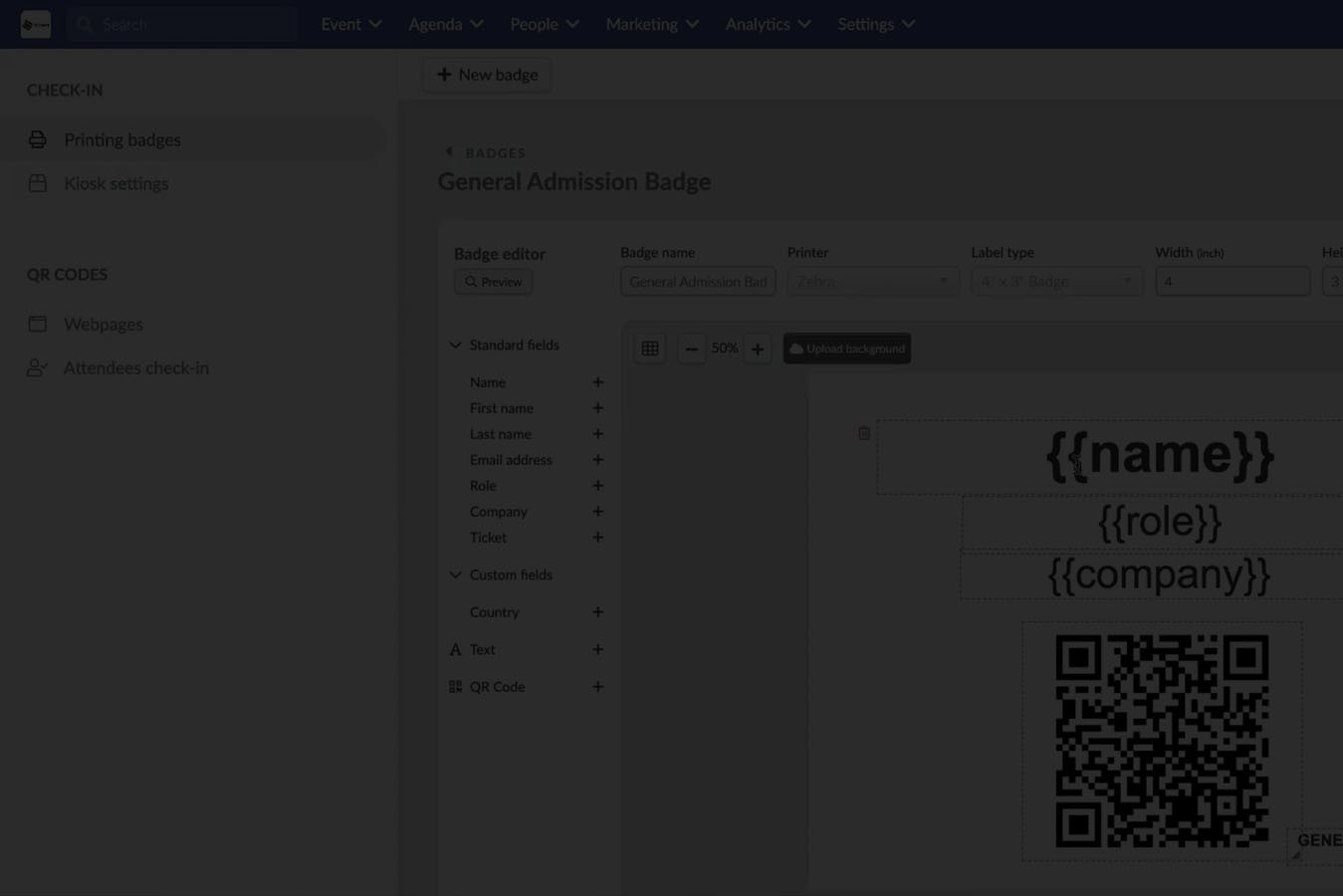
A badge design and layout builder is software that allows event teams to create, manage, and print dynamic attendee badges using live registration data, role-based rules, and real-time updates—so badges work reliably across onsite, hybrid, and multi-event programs.
Once you see badges as part of your event’s infrastructure, not a design deliverable, the conversation changes. And that shift starts with understanding what this software actually is—and what it replaces.
A badge design & layout builder is not just a canvas where you place text boxes and logos.
At its core, it is a system that connects badge layouts to live attendee data, check-in workflows, and access logic—so what prints on a badge is always accurate, intentional, and enforceable.
Most teams don’t realize how many tools they’re stitching together just to get badges out the door:
Design files created in tools like Illustrator or InDesign
Spreadsheets exported from registration systems
Mail merges or CSV uploads sent to printers
Last-minute manual edits onsite
Separate tools for scanning, access, or lead capture
A badge design & layout builder replaces that entire patchwork with a single, connected workflow.
Instead of static files that freeze weeks before the event, badge builders eliminate:
One-off design files that require re-exports for every change
Manual name corrections at check-in
Separate badge versions for different attendee types
Emergency reprints caused by outdated data
Reliance on external designers for simple updates
This matters because event data is never static. Attendees change jobs. Roles get updated. VIP lists evolve. Speakers cancel or get added. When badges can’t reflect those changes in real time, teams end up firefighting.
A true badge design & layout builder makes badges:
Dynamic – fields update from live registration data
Conditional – layouts change based on role, ticket type, or permissions
Printable on demand – no pre-printing or guessing quantities
Integrated – badges work with check-in, scanning, and access control
For example, the same base layout can:
Show a red stripe for staff
Display a sponsor logo only for paid exhibitors
Hide company names for VIPs
Encode access permissions into a QR code or NFC chip
All without creating separate files.
This is where competitor content often falls short.
A badge design & layout builder is not:
A generic design tool with no live data connection
A static PDF generator
A printer driver or hardware add-on
A one-time template you reuse forever
It’s also not useful in isolation. The value only appears when badge design is connected to registration, check-in, and analytics which brings us to the real issue most teams face.
Badges don’t fail because they look bad. They fail because they’re disconnected from operations.When badges break, the consequences are operational—not aesthetic.
Check-in slows down.
Security teams lose confidence.
Sponsors complain about visibility.
Staff scramble to fix errors in real time.
Yet many teams still approach badge creation as a design task handled weeks before the event, then “handed off” to operations. That separation is the root cause of most badge-related problems.
Here’s why.
Badge data lives in registration systems.
Badge printing happens at check-in.
Badge scanning happens across sessions, rooms, and booths.
When design is disconnected from those systems, every update becomes manual.
That’s why:
A last-minute attendee change requires a reprint
A role misclassification puts someone in the wrong room
A sponsor’s branding appears inconsistently
Staff spend event morning fixing typos instead of welcoming guests
Design tools were never built for this environment. They assume the data is final. Live events never are.
Operationally sound badge design requires:
Live data synchronization
Clear rules for who sees what
Consistent layouts enforced automatically
Instant reprints without redesign
This is especially critical at scale. A 50-person workshop can survive manual fixes. A 5,000-person conference cannot.
Once badge design becomes part of your check-in and access infrastructure, teams stop reacting and start controlling the experience.
That’s why the next question isn’t “what should the badge look like?”
It’s “how does this badge function before, during, and after check-in?”
And to answer that, we need to look at how a badge design & layout builder actually works in practice.
Once teams stop thinking of badges as one-off prints, a bigger question appears:
How does this scale beyond a single event?
Most badge builders collapse the moment you introduce:
Hybrid attendance
Multi-day access rules
Regional roadshows
Portfolio-level event programs
A real badge design & layout builder must handle all of it—without redesigning everything from scratch.
Hybrid events expose weak badge systems fast.
Onsite attendees need:
Printed badges
Visual access cues
Scan-based session entry
Virtual attendees don’t need badges—but they still need:
Identity verification
Session permissions
Engagement tracking tied to their profile
The mistake many teams make is treating these as separate systems.
A unified badge system solves this by:
Using the same profile logic for onsite and virtual
Applying badge rules only when physical access is required
Keeping one attendee record across formats
That way:
A hybrid attendee who switches to onsite mid-event doesn’t break the system
Session attendance remains consistent
Engagement data stays clean
The badge layout is just one expression of a broader identity framework.
Multi-day events introduce access drift:
Day-only passes
VIP dinners
Restricted workshops
Executive sessions that unlock later
Static badges can’t adapt to this. Dynamic badges can.
With a proper layout builder:
Day-specific access can be enforced through scanning rules
Visual indicators can change per reprint
Staff don’t need to remember who belongs where
If access changes, the badge changes. Not the rules. Not the process. Just the output.
This prevents:
Manual badge swaps
Sticker chaos
Verbal exceptions that security can’t verify
Enterprise teams rarely run one event.
They run:
Annual flagships
Regional roadshows
Customer summits
Internal programs
Partner events
A strong badge design system allows teams to:
Reuse layouts across events
Lock core elements globally
Customize only what varies locally
This creates:
Brand consistency
Operational efficiency
Faster event launches
Lower training overhead
Design once. Deploy everywhere. Adjust when needed without rebuilding.
Badge design doesn’t end at aesthetics or access. At scale, it becomes a question of inclusion and compliance.
Badges must be readable by everyone—fast.
That means:
Font sizes that work at arm’s length
High contrast for low-light environments
Clear name hierarchy
Avoiding decorative fonts that reduce legibility
Poor accessibility slows check-in, increases errors, and creates unnecessary friction for attendees and staff alike.
A real layout builder allows teams to:
Control font families and sizes precisely
Test layouts before deployment
Prevent accidental overrides by last-minute edits
Accessibility isn’t a “nice to have.” It’s a throughput requirement.
Global events require localized badges:
Different languages
Name ordering differences
Cultural formatting preferences
The wrong approach is duplicating designs per region.
The right approach:
One base layout
Language-aware fields
Conditional display rules
This allows:
The same badge design to render correctly in Tokyo, Paris, and São Paulo
Central teams to maintain control
Local teams to operate confidently
Localization becomes configuration—not reinvention.
Badges sit at the intersection of identity, access, and data. That makes them security-sensitive by default.
Every badge carries:
Personally identifiable information
Access permissions
Session entitlements
Interaction history
If badge generation is disconnected from the core event platform, risk multiplies:
Data mismatches
Unauthorized access
Audit gaps
Manual overrides with no traceability
A secure badge design & layout builder:
Pulls data directly from the authoritative source
Avoids manual exports
Applies permission logic consistently
Logs every print and reprint
This creates:
Clear audit trails
Reduced human error
Confidence for compliance teams
By this point, the pattern is clear. Teams that struggle with badge design treat it as a peripheral task. Teams that scale treat it as infrastructure.
InEvent is built for the second group.
InEvent’s badge design & layout builder is not a standalone feature. It’s embedded into:
Registration
Check-in
Access control
Analytics
Lead capture
That means:
No syncing issues
No duplicate systems
No mismatched data
Design decisions flow directly into operations.
InEvent supports:
On-demand printing at scale
Offline-capable workflows
Printer redundancy
Instant reprints without design drift
This matters when:
2,000 attendees arrive in 45 minutes
VIPs show up unannounced
Network conditions degrade
Staff rotate mid-shift
The system holds. The experience stays calm.
InEvent’s layout builder is:
Powerful enough for complex rules
Controlled enough to prevent mistakes
Simple enough for ops teams to run confidently
Design is centralized. Execution is distributed. That’s how enterprise events stay consistent even when teams are lean.
Badges are the first physical interaction your attendees have with your event. When they’re treated as an afterthought:
Lines slow down
Access breaks
Data gets messy
Teams scramble
When they’re treated as infrastructure:
Check-in flows
Security holds
Analytics stay clean
Sponsors and stakeholders get better outcomes
InEvent helps teams move from static badge templates to dynamic, secure, scalable badge systems—designed for real events, not ideal scenarios.
Book a demo with InEventA badge design & layout builder is a system that lets event teams create, manage, and control attendee badge layouts directly inside the event platform. It defines what information appears on the badge, how it is structured, and how it prints across onsite check-in workflows.
Unlike graphic design tools, a true badge builder is connected to live attendee data. That means names, roles, access levels, QR codes, and permissions update automatically—without exporting files or redoing designs.
For large or multi-day events, the badge builder becomes part of the access control system, not just a design surface.
Design tools like Canva or static PDFs focus on visuals only. They are not connected to registration data, access rules, or onsite operations.
An event badge builder:
Pulls data directly from attendee profiles
Updates badges automatically when data changes
Enforces access logic through QR codes or permissions
Supports reprints without redesigning files
Using static templates usually leads to:
Manual exports
Version mismatches
Slower check-in
Higher error rates onsite
For small meetups, this may be manageable. For enterprise events, it does not scale.
Yes and this is a core requirement for serious events.
A proper badge layout builder allows you to:
Create multiple badge templates
Assign them by role, ticket type, or permission group
Control what data appears for each audience
For example:
Attendees see name, company, and QR code
Speakers include session indicators
Staff badges include access zones
Sponsors include branding or tier markers
This avoids confusion onsite and removes the need for stickers or manual exceptions.
Badge design directly affects throughput.
Clear layouts with:
Large names
High-contrast text
Scannable QR codes
Visible access indicators
Reduce:
Time spent verifying identity
Staff questions at entry points
Secondary checks for restricted sessions
Poor badge design creates bottlenecks—even if the check-in system itself is fast. The layout is part of the operational flow, not just branding.
Yes. And for many events, they must.
With a dynamic badge system:
Access can change mid-event
Badges can be reprinted instantly
Updated permissions apply automatically
This matters for:
Multi-day passes
VIP upgrades
Last-minute speaker additions
Restricted workshops or dinners
Static badge systems force teams to improvise. Dynamic systems adapt in real time.
They should.
Enterprise events cannot rely on perfect connectivity. A reliable badge design and printing system supports:
Offline check-in
Local badge printing
Syncing once connectivity is restored
This ensures:
Check-in continues even if Wi-Fi fails
Badge layouts remain consistent
Access rules are still enforced
Offline capability is not an edge case, it’s an operational requirement.
QR codes on event badges are used to:
Verify attendee identity
Track session entry
Control access to restricted areas
Capture sponsor leads (when enabled)
When scanned, the code connects the physical interaction to the attendee’s digital profile. This creates a clean audit trail and enables accurate reporting.
The QR code itself is only useful if it’s tied to real-time data and permissions. Static codes without platform logic offer limited value.
They can be if the system is designed correctly.
A secure badge builder:
Pulls only approved fields onto the badge
Applies role-based visibility rules
Logs prints and reprints
Avoids uncontrolled data exports
This reduces the risk of exposing sensitive information and supports internal privacy and compliance requirements.
Security is not just about encryption, it’s about control and traceability.
Yes, and this is one of the biggest efficiency gains.
Reusable badge templates allow teams to:
Standardize branding
Reduce setup time
Train staff once
Maintain consistency across regions
Templates can still support:
Event-specific fields
Local language variations
Role-based differences
Design once. Deploy everywhere.
In practice, badge design sits at the intersection of both.
Marketing cares about:
Brand consistency
Visual quality
Operations care about:
Speed
Accuracy
Access control
The best systems allow marketing to define the structure and branding, while operations control execution and permissions, without stepping on each other.
Because badge design is not treated as a standalone feature. InEvent connects badge layouts directly to:
Registration data
Check-in workflows
Access control
Analytics and reporting
This creates:
Faster onsite operations
Fewer errors
Better security
Cleaner data post-event
For teams running complex, high-volume events, badge design becomes infrastructure. InEvent is built for that reality.